


Workers Comp Audits
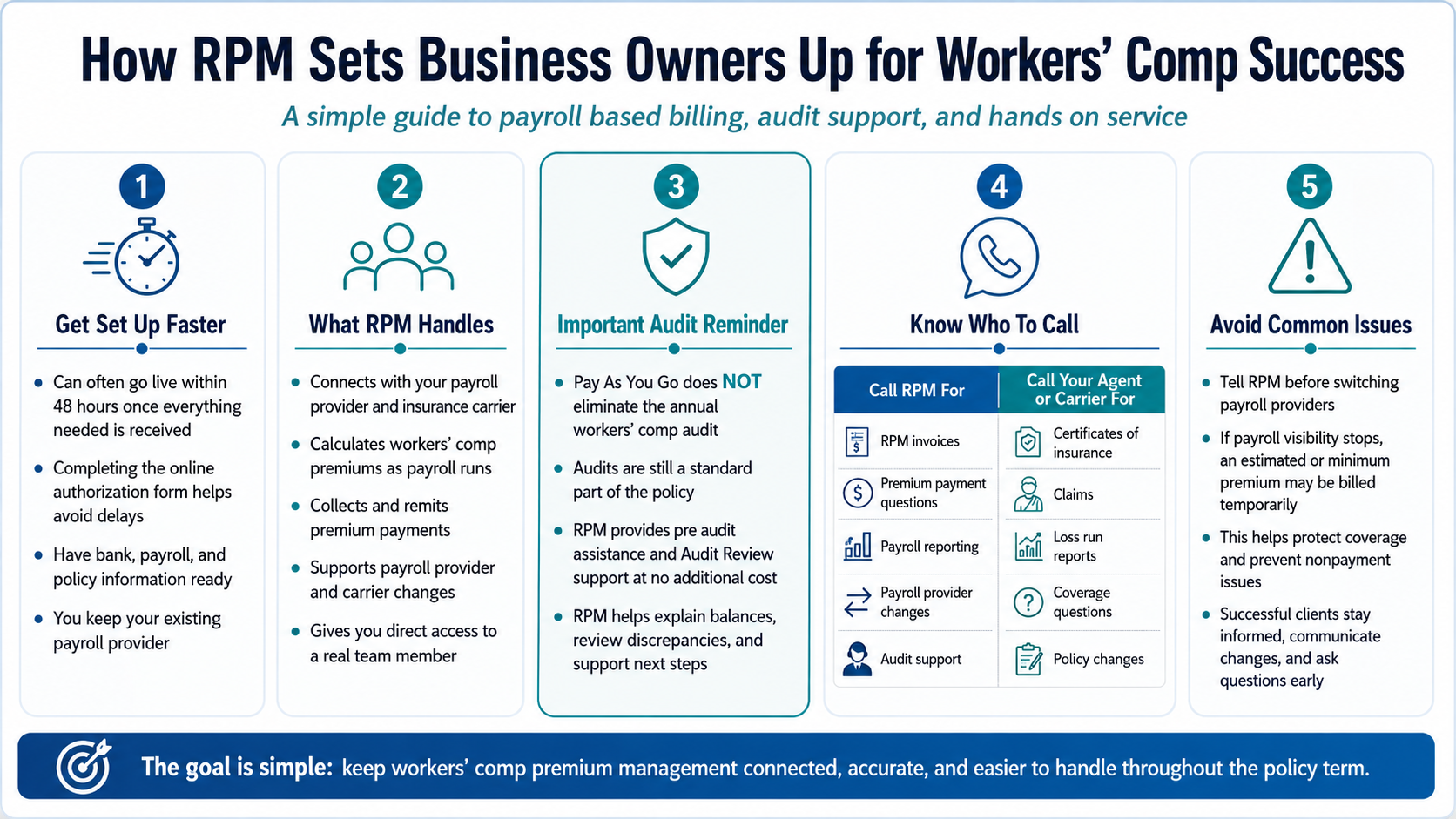
Workers’ comp should not become another process a business owner has to constantly monitor.
RPM, helps manage the premium payment side of workers’ comp by connecting with your existing payroll provider and insurance carrier, calculating premiums as payroll runs, handling premium payments, supporting payroll changes, and helping you prepare for and review your annual audit.
The goal is to make the process easier to manage while giving you a real team to call when something changes or does not look right.
One point is especially important to understand from the start: Pay As You Go workers’ comp does not eliminate the annual workers’ comp audit. The audit is still part of the policy. RPM helps make that process easier through pre audit assistance and Audit Review support that is included with the service.
What Does Working With RPM Actually Look Like?
RPM supports business owners throughout the policy term, not only when a premium payment is due.
| Stage | How RPM Helps |
| Getting started | Connects with your existing payroll provider and insurance carrier and sets up the premium payment process |
| Each payroll | Uses payroll data to calculate premiums and manages collection and remittance |
| Payroll changes | Helps maintain the connection when payroll information or providers change |
| Questions | Gives you direct access to a real RPM team member |
| Audit time | Provides pre audit assistance and reviews the final audit for accuracy |
| Carrier changes | Helps maintain the RPM relationship when moving between supported carriers |
You remain with the payroll provider and insurance partners you already trust. RPM acts as the connection between payroll and workers’ comp premium payments.
How Can You Get Set Up With RPM Faster?
RPM can often get a business live within 48 hours once everything needed for setup is received and the timing of the policy and payroll allows it.
There are a few reasons activation may naturally take longer. A workers’ comp policy may have a future effective date, for example, or the business’s next payroll run may still be several days away. Those are timing factors that neither RPM nor the business owner can speed up.
What you can control is how complete your setup information is.
One of the easiest ways to avoid delays is to complete RPM’s online authorization form rather than returning an incomplete PDF. The online form uses required fields, which helps prevent important details from being missed. Bank account information is one of the most common pieces of missing information.
If you want to make setup as efficient as possible, complete the authorization form online and have your banking, payroll, and policy information ready before you begin.
Do you have to switch payroll providers?
No.
This is one of the most common misconceptions about RPM. RPM does not replace your payroll provider. It connects to the payroll company you already use. That means there is no need to rebuild a payroll process that already works for your business simply to use Pay As You Go workers’ comp.
What Happens Once You Are Live?
Once the connection is established, RPM receives the payroll information needed to calculate workers’ comp premium payments. As payroll is processed, RPM manages the premium calculation, collection, and remittance process with the carrier.
For the business owner, the experience is designed to become relatively hands off. You continue running payroll and operating your business while RPM manages the workers’ comp premium payment process in the background.
But hands off does not mean you are on your own.
When You Have a Question, Call RPM Directly
One of the most practical advantages of RPM is access to a real person.
Customers sometimes assume they need to contact their insurance agent first when they have a question about an RPM invoice, payroll reporting, or premium payment. That can add an unnecessary extra step because the agent may ultimately need to contact RPM for the answer.
For questions about the process RPM manages, call RPM directly.
As one RPM team member put it:
“A lot of people, when we answer, are like, ‘Oh my gosh, it’s a human. Thank you for answering.’”
That human support matters most when something changes. A missed payroll report, an unexpected invoice, a payroll provider change, or an audit question is easier to address when you can speak directly with the team working on the account.
What Happens If Your Payroll Changes?
Businesses rarely stay exactly the same for an entire policy year.
You may hire employees, change payroll frequency, experience seasonal fluctuations, or move to a different payroll provider. RPM can support those changes, but the team needs to know they are happening.
One of the most important things a business owner can do is tell RPM before switching payroll providers.
Payroll provider changes commonly happen at the beginning of the year and around quarter end. If RPM suddenly stops receiving payroll information without knowing why, the premium payment process can be interrupted.
The earlier we know about the change, the easier it is to update the connection and keep reporting moving smoothly.
Why Might RPM Bill a Minimum or Estimated Premium If Payroll Stops?
If RPM loses visibility into your payroll, there is a larger issue than simply missing a payroll report.
Your insurance carrier still expects premium payments. If those payments stop, the workers’ comp policy may be at risk of cancellation for nonpayment.
To help protect against that situation, RPM may bill an estimated or minimum premium while payroll reporting is unavailable. Once payroll reporting resumes, the premium information can be updated based on the available payroll data.
This is designed to protect continuity while the payroll issue is being resolved.
For example, if a business changes payroll providers but does not tell RPM, the payroll feed may suddenly stop. Informing RPM before the switch gives the team time to coordinate the new payroll connection rather than reacting after payroll data disappears.
Does Pay As You Go Mean You Can Skip the Workers’ Comp Audit?
No.
This is one of the most important expectations RPM wants business owners to understand.
Pay As You Go helps keep premium payments aligned with payroll during the year, but it does not eliminate the workers’ comp audit.
The annual audit remains a standard part of the workers’ comp policy. The carrier or auditor ultimately determines the final premium based on payroll, class codes, business operations, and other policy information.
Where RPM adds significant value is in helping you through that process.
RPM supports you before the audit
RPM can provide pre audit assistance reports that help organize the payroll information connected to your policy.
Instead of reaching audit time and trying to reconstruct a full year of information from scratch, you have support from a team that has already been involved in the premium payment process.
RPM reviews the audit after it is completed
Audit Review assistance is included with RPM’s Pay As You Go service at NO additional cost.
RPM can review the audit against payroll history and invoicing, help explain why a balance exists, identify potential discrepancies, and work with you through the next steps. If something does not appear accurate, RPM can also help guide you through the dispute process when appropriate.
The audit itself does not disappear. What changes is that you do not have to navigate it alone. For some business owners, that support is one of the most valuable parts of the entire RPM relationship.
Who Should You Call: RPM, Your Agent, or Your Carrier?
RPM helps manage workers’ comp premium payments, but it is not your insurance carrier or insurance agent.
Knowing who handles what can save time.
|
Contact RPM About |
Contact Your Agent or Carrier About |
|
RPM invoices |
Certificates of insurance |
| Premium payment questions | Loss run reports |
| Payroll reporting | Claims |
| Payroll provider changes | Coverage questions |
|
Audit preparation and review |
Policy or coverage changes |
| Questions about the RPM service |
Insurance advice |
If the question is about payroll data, premium payments, an RPM invoice, or audit support, start with RPM.
If it is about your coverage, claim, certificate, loss runs, or a policy change, contact your insurance agent or carrier.
What Happens If You Change Insurance Carriers?
Changing carriers does not automatically mean starting over with RPM. RPM works with more than 100 insurance carriers, which gives business owners flexibility if their insurance placement changes.
If you know your carrier is changing, let RPM know early. The team can determine what is needed to keep the premium payment setup moving with the new carrier. The same principle applies to payroll changes: communication before the transition is much easier than trying to fix a disconnected process afterward.
What Do Successful RPM Clients Do Differently?
The business owners who get the most value from RPM generally do three simple things.
1. They let RPM handle the process, but they know they can call
You should not have to monitor every premium calculation yourself. RPM manages the payment process, while the support team remains available when you have a question. That combination gives business owners the ability to stay hands off without feeling disconnected.
2. They tell RPM when something changes
A payroll provider switch, new payroll setup, unusual interruption, or carrier change is easier to manage when RPM knows about it before it happens. A quick conversation can prevent a much larger problem later.
3. They ask before making an extra payment
If something looks unusual or you are thinking about sending an additional payment, contact RPM first. It is much easier to review the account before the payment is made than to trace and correct an unnecessary payment afterward.
Successful clients do not need to become workers’ comp experts. They stay informed, communicate changes, and trust RPM to manage the premium payment process.
What Does Workers’ Comp Success Look Like With RPM?
Success is not about never hearing from your workers’ comp provider again.
It is knowing that the premium payment process is being managed while still having a real person available when you need one.
It means:
- Keeping the payroll provider you already trust
- Paying premiums based on current payroll information
- Knowing who to call when payroll changes
- Getting support when something looks wrong
- Understanding that audits still happen and having help when they do
- Having fewer administrative tasks to manage yourself
- Being able to change payroll providers or supported carriers without assuming the entire process needs to start over
RPM is there to make workers’ comp premium management easier throughout the policy term, from setup and payroll reporting to payment questions and annual audit support.
Frequently Asked Questions
Does Pay As You Go workers’ comp eliminate the annual audit?
No. Pay As You Go does not eliminate the workers’ comp audit. RPM provides pre audit assistance and Audit Review support to help clients prepare for and understand the audit process.
How quickly can a business get started with RPM?
RPM can often get a business live within 48 hours once all required information has been received and the policy effective date and payroll timing allow setup to begin.
Do I have to change payroll providers to use RPM?
No. RPM connects with your existing payroll provider rather than replacing it.
What should I do if I plan to change payroll providers?
Contact RPM before making the switch. This gives the team time to coordinate the new payroll connection and reduce interruptions in premium reporting.
Why would RPM bill an estimated or minimum premium?
If payroll reporting stops, the carrier still expects premium payments. An estimated or minimum premium may be billed while payroll visibility is restored to help prevent a nonpayment issue.
Should I call RPM or my insurance agent if I have a question?
Call RPM fo questions about RPM invoices, premium payments, payroll reporting, payroll changes, or audit support. Contact your agent or carrier for certificates of insurance, claims, loss runs, coverage questions, or policy changes.
Make Workers’ Comp One Less Thing to Manage
Workers’ comp involves more than making a premium payment every pay period. Payroll changes. Carriers change. Questions come up. Audits still happen. The value of RPM is having one team focused on keeping the premium payment process connected through all of it.
If you are ready for a more hands off workers’ comp payment experience, get started with RPM and let the team help you manage the process from onboarding through audit.
About Reliable Premium Management
Reliable Premium Management (RPM) helps businesses, agents, and carriers make workers’ comp simple and predictable. With real-time Pay As You Go premiums, hands-on audit support, and a team that’s always here for you, RPM delivers confidence and clarity to more than 10,000 clients nationwide.
Want to learn more?